
Mistral Basic AI Agent Using NextJS with TypeScript With Full Backend Code
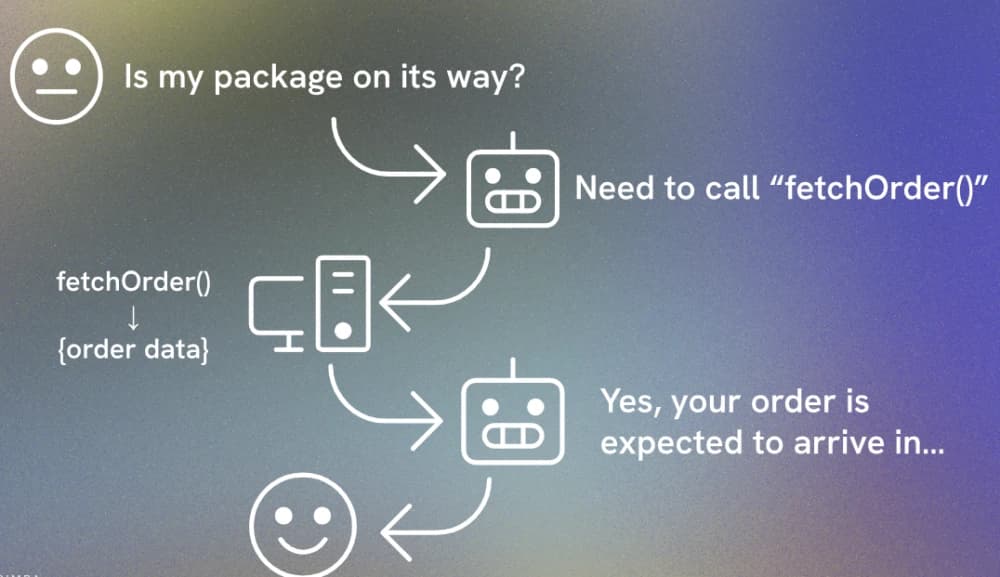
In this tutorial, I will guide you step-by-step on how to use Mistral AI's powerful mistral-large-latest model to build a custom agent that can track and respond to payment statuses and transaction dates. This tutorial assumes you have a basic understanding of JavaScript, Next.js, and how to work with APIs. By the end of this guide, you will know how to create a responsive agent that integrates with real-time data fetching functions.
Prerequisites
Before you begin, make sure you have:
- Basic knowledge of JavaScript, Node.js, and Next.js.
- A Mistral AI account for API access.
- Installed Next.js, Zod, and the Mistral client.
If you haven't installed these yet, you can do so by running:
npx create-next-app@latest arfat cd arfat npm i @mistralai/mistralai zod
Important links
- https://docs.mistral.ai/getting-started/quickstart/ ⇒ Docs
- https://huggingface.co/mistralai/Mistral-7B-Instruct-v0.1 ⇒ Mistral in hugginface
- https://docs.mistral.ai/api/#tag/chat/operation/chat_completion_v1_chat_completions_post ⇒ Chat completion
- https://docs.aws.amazon.com/bedrock/latest/userguide/model-parameters-mistral-chat-completion.html ⇒ Chat completion
- https://mistral.ai/en/products/la-plateforme#models ⇒ latest models
- https://mistral.ai/en/news/mixtral-of-experts ⇒ choose model as you required
- https://docs.mistral.ai/capabilities/embeddings/ ⇒ Embeddings
Get API key
- https://auth.mistral.ai/ui/login ⇒ Sign in
- Create workspace if you’re new user
- Get Experimental Subscription
- https://console.mistral.ai/api-keys ⇒ Get API keys from here
Mistral Free Tier Limitations
- 1 request per second: You can make one API request per second.
- 500,000 tokens per minute: The total number of tokens you can use in one minute.
- 1 billion tokens per month: The maximum token limit you can use in a month.
These limitations are important to keep in mind while developing, so you can optimize how frequently you call the API to avoid exceeding the free tier limits.
Schema and Input Validation
We'll begin by validating the user input to ensure that the data passed to the Mistral AI model is in the correct format. Using Zod for validation, here's how you can ensure that the input text is a non-empty string:
const inputSchema = z.object({ inputText: z .string({ invalid_type_error: "Input text must be a string", // Error message if the input is not a string required_error: "Input text is required", // Error message if the input is missing }) .min(1, { message: "Input text cannot be empty" }), // Ensures the string is not empty });
Defining Mistral Messages
To interact with Mistral AI, we need to define a message interface that structures the conversation. The messages will have different roles such as system, user, assistant, and tool.
export interface MistralMessage { role: "system" | "user" | "assistant" | "tool"; content: string; name?: string; // Optional name field toolCallId?: string; // Optional name field }
This allows Mistral AI to process incoming data and respond with human-like messages.
Setting Up the Mistral Client
Mistral's client is an interface that allows you to send requests to the API. You'll need to set up the Mistral client with your API key and initialize the client in your code:
import { Mistral } from "@mistralai/mistralai"; const apiKey = process.env.MISTRAL_API_KEY; export const mistralClient = new Mistral({ apiKey: apiKey });
Fetching Payment Data: Creating Helper Functions
We'll simulate payment data for testing by creating a mock database. The transactionData array contains payment information, and we’ll use two functions to retrieve the payment status and date based on a transaction ID.
const transactionData = [ { transaction_id: "T1001", customer_id: "C001", payment_amount: 125.5, payment_date: "2021-10-05", payment_status: "Paid", }, ]; export function getPaymentStatus({ transactionId }: { transactionId: string }) { const transaction = transactionData.find( (row) => row.transaction_id === transactionId ); if (transaction) return JSON.stringify({ status: transaction.payment_status }); return JSON.stringify({ error: "Transaction ID not found." }); } export function getPaymentDate({ transactionId }: { transactionId: string }) { const transaction = transactionData.find( (row) => row.transaction_id === transactionId ); if (transaction) return JSON.stringify({ date: transaction.payment_date }); return JSON.stringify({ error: "Transaction ID not found." }); }
These functions will serve as "tools" for the assistant to fetch the required payment data.
Mistral Tools: Connecting Functions with the AI Model
Mistral AI can call external functions (tools) to fetch data. Here, we define two tools: getPaymentStatus and getPaymentDate.
import { Tool } from "@mistralai/mistralai/models/components"; const mistralTools: Tool[] = [ { type: "function", function: { name: "getPaymentStatus", description: "Get the payment status of a transaction", parameters: { type: "object", properties: { transactionId: { type: "string", description: "The transaction ID.", }, }, required: ["transactionId"], }, }, }, { type: "function", function: { name: "getPaymentDate", description: "Get the payment date of a transaction", parameters: { type: "object", properties: { transactionId: { type: "string", description: "The transaction ID.", }, }, required: ["transactionId"], }, }, }, ];
These tools will allow Mistral to call these functions when needed.
The Main POST Handler
In the main POST request handler, we process the user’s query and send it to Mistral AI. If Mistral determines that a tool is needed (e.g., to fetch the payment status or date), it will invoke the appropriate function.
export async function POST(request: Request) { try { const body = await request.json(); const { inputText } = inputSchema.parse(body); const messages: MistralMessage[] = [ { role: "system", content: "You are a friendly assistant" }, { role: "user", content: inputText }, ]; const response = await mistralClient.chat.complete({ model: "mistral-large-latest", messages, toolChoice: "any", tools: mistralTools, temperature: 0.7, responseFormat: { type: "text" }, }); if (response?.choices && response.choices[0]?.message?.role === "assistant") { if (response?.choices[0].finishReason === "stop") { return formatResponse( { finalAnswer: response?.choices[0].message.content, ...response }, "Data fetched successfully" ); } if (response?.choices[0]?.finishReason === "tool_calls") { const toolCalls = response.choices[0]?.message?.toolCalls; if (toolCalls && toolCalls.length > 0) { const functionName = toolCalls[0]?.function?.name as keyof typeof availableFunctions; const functionArgs = JSON.parse(toolCalls[0]?.function?.arguments as string); const functionResponse = availableFunctions[functionName](functionArgs); messages.push({ role: "tool", name: functionName, content: functionResponse, toolCallId: toolCalls[0].id, }); await delay(3000); const functionREs = await mistralClient.chat.complete({ model: "mistral-large-latest", messages, }); return formatResponse(functionREs, "Data fetched successfully"); } } } } catch (error) { console.log("Error", { error }); return routeErrorHandler(error); } }
Full Code
import { formatResponse, routeErrorHandler } from "@/lib/api-response"; import { Mistral } from "@mistralai/mistralai"; // Import the Mistral client library to interact with Mistral AI export interface MistralMessage { role: "system" | "user" | "assistant" | "tool"; content: string; name?: string; // Optional name field toolCallId?: string; // Optional name field } /** * Schema for validating text input. * This ensures that the input is a non-empty string. */ export const inputSchema = z.object({ inputText: z .string({ invalid_type_error: "Input text must be a string", // Error message if the input is not a string required_error: "Input text is required", // Error message if the input is missing }) .min(1, { message: "Input text cannot be empty" }), // Ensures the string is not empty }); // Retrieve the Mistral API key from environment variables const apiKey = process.env.MISTRAL_API_KEY; // Initialize the Mistral client with the API key (this is used to interact with Mistral's APIs) export const mistralClient = new Mistral({ apiKey: apiKey }); import { Tool } from "@mistralai/mistralai/models/components"; import { z } from "zod"; const transactionData = [ { transaction_id: "T1001", customer_id: "C001", payment_amount: 125.5, payment_date: "2021-10-05", payment_status: "Paid", }, ]; export function getPaymentStatus({ transactionId }: { transactionId: string }) { const transaction = transactionData.find( (row) => row.customer_id === transactionId ); if (transaction) return JSON.stringify({ status: transaction.payment_status }); return JSON.stringify({ error: "transaction id not found." }); } export function getPaymentDate({ transactionId }: { transactionId: string }) { const transaction = transactionData.find( (row) => row.transaction_id === transactionId ); if (transaction) { return JSON.stringify({ date: transaction.payment_date }); } return JSON.stringify({ error: "transaction id not found." }); } export const mistralTools: Tool[] = [ { type: "function", function: { name: "getPaymentStatus", description: "Get the payment date of a transaction", parameters: { type: "object", properties: { transactionId: { type: "string", description: "The transaction id.", }, }, required: ["transactionId"], }, }, }, { type: "function", function: { name: "getPaymentDate", description: "Get payment status of a transaction", parameters: { type: "object", properties: { transactionId: { type: "string", description: "The transaction id.", }, }, required: ["transactionId"], }, }, }, ]; // Available functions for tool calls const availableFunctions = { getPaymentDate, getPaymentStatus, } as const; // Using `as const` to make function names literal types // Helper function to create a delay (for waiting before next operation) const delay = (ms: number) => new Promise((resolve) => setTimeout(resolve, ms)); /** * Handles POST requests to interact with the Mistral AI model. * @param request - The incoming request object containing user input. * @returns Formatted response or error message. */ export async function POST(request: Request) { try { // Step 1: Parse and validate input text from the user request const body = await request.json(); const { inputText } = inputSchema.parse(body); // Validates input using Zod schema // Step 2: Prepare initial messages with system behavior and user input const messages: MistralMessage[] = [ { role: "system", // Defines the assistant's role and behavior content: "You are a friendly assistant", }, { role: "user", // User input message content: inputText, }, ]; // Step 3: Send messages to the Mistral chat model for a response const response = await mistralClient.chat.complete({ model: "mistral-large-latest", // AI model to generate the response messages, toolChoice: "any", // Allow any tool to be chosen tools: mistralTools, // Available tools for the assistant temperature: 0.7, // Controls the randomness of responses responseFormat: { type: "text", // Plain text response format }, }); // Step 4: Check if the assistant provided a valid response if ( response?.choices && response.choices[0]?.message?.role === "assistant" ) { // Add assistant's response to the messages messages.push(response.choices[0]?.message as MistralMessage); // Step 5: Handle completion based on the assistant's finish reason if (response?.choices[0].finishReason === "stop") { // If the assistant finishes the task, return the response return formatResponse( { finalAnswer: response?.choices[0].message.content, ...response, }, "Data fetched successfully" ); } else if ( response?.choices && response.choices[0]?.finishReason === "tool_calls" ) { // Handle tool calls if the assistant requires additional functions const toolCalls = response.choices[0]?.message?.toolCalls; if (toolCalls && toolCalls.length > 0) { // Extract the function name and arguments from tool calls const functionName = toolCalls[0]?.function ?.name as keyof typeof availableFunctions; // Ensures it's a valid function const functionArgs = JSON.parse( toolCalls[0]?.function?.arguments as string ); // Call the relevant function with arguments const functionResponse = availableFunctions[functionName](functionArgs); // Add tool response to messages messages.push({ role: "tool", name: functionName, content: functionResponse, toolCallId: toolCalls[0].id, }); // Wait for a short delay before continuing await delay(3000); // Step 6: Send the updated messages back to the Mistral model const functionREs = await mistralClient.chat.complete({ model: "mistral-large-latest", messages, }); // Return the response after the tool function execution return formatResponse(functionREs, "Data fetched successfully"); } // Default response if no special conditions were met return formatResponse(response, "Data fetched successfully"); } } } catch (error) { // Log and return an error response if any step fails console.log("Error", { error }); return routeErrorHandler(error); } }
Conclusion
With this approach, we’ve successfully built a custom agent that can interact with Mistral AI to fetch real-time data. We used Mistral AI’s mistral-large-latest model, along with helper functions and tools, to create an intelligent agent capable of answering user queries about payment status and dates.
Useful Links:
- Visit my portfolio: arfat.app
- GitHub: https://github.com/arfat-xyz
- LinkedIn: https://www.linkedin.com/in/arfat-rahman/
- Email: [email protected]


About the Author

Comments
No Comments
Leave a replay
Your email address will not be publish. Required fields are marked *